
Pim Claude Code and Codex, at your Mac and from your phone
Your Mac's AI agents, anywhere. Tell Pim what you want done and it hands the work to Claude Code or Codex in the right folder, keeps an eye on it and tells you how it went. Or take the wheel from your iPhone or Android phone: approve each step from a notification, watch the live terminal, review the diff and take over the screen. At your desk, Pim for Mac keeps them all in one window.

Free, no ads. For iPhone with iOS 18 or later and Android phones with Android 8.0 or later, with Pim for Mac (free) on a Mac with Apple silicon and macOS 14 or later, and Claude Code or Codex set up on that Mac. No Mac at hand? Try the demo in the app.
Pim for iPhone and Android
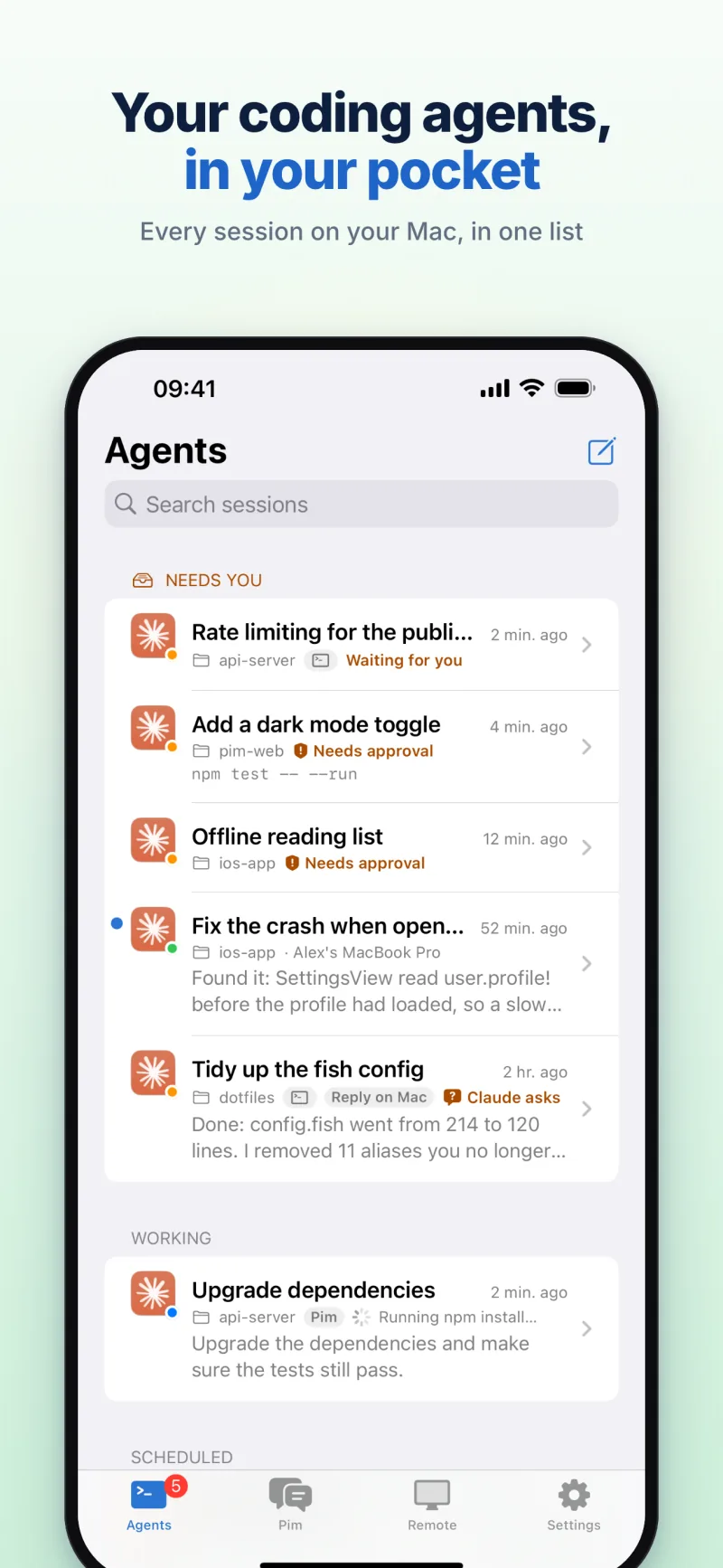
Your agents and your Mac, wherever you are: hand work to Pim, approve steps, review the diff and take over the screen.
Hand it to Pim
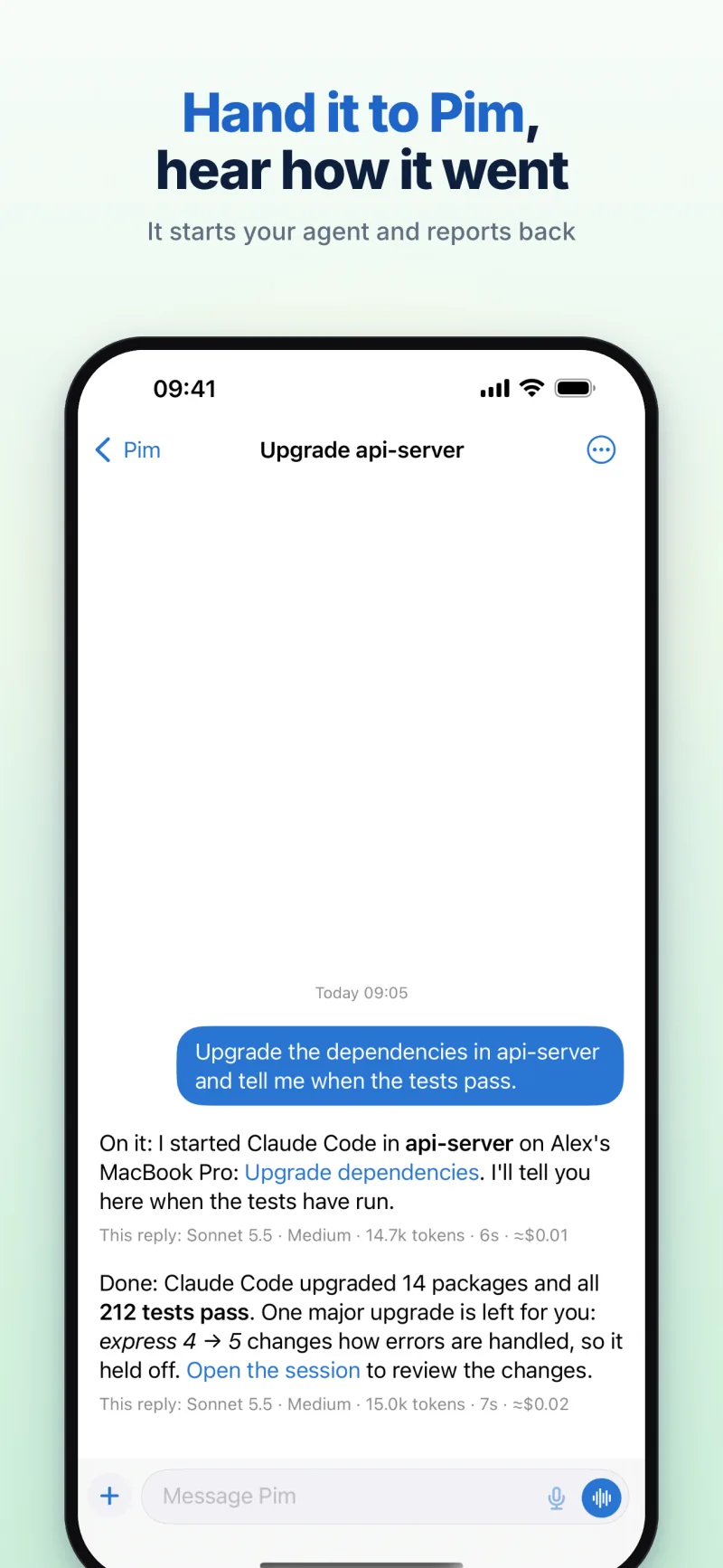
Tell Pim what you want done — "upgrade the dependencies in api-server and tell me when the tests pass" — and it starts Claude Code or Codex in the right folder on your Mac, keeps an eye on the session and tells you how it went in the same conversation, with a link to it. Ask what your agents did overnight, or have Pim send a session its next step. Approvals stay yours: Pim never answers them. It handles Mac chores itself — finding a file and sending it over, a screenshot, how the Mac is doing — in as many conversations as you like, with photos, files or your location. It remembers your preferences, runs scheduled tasks like a morning briefing of your agents' work, and answers in your own Telegram bot. Reply to it — or to an agent session that's done — right from the notification (on Android, from version 12). On the iPhone, talk to it too — or hands-free in voice mode — and ask it from Siri, widgets or any app's share sheet.
Coding agents, from anywhere
Start a Claude Code or Codex session in any project folder on your Mac: pick the model and how hard it thinks, and attach photos or files. Follow every step live, and write the next message while it works. The list puts what needs you first, then Working, Scheduled, Today and Earlier — the sessions you started in a terminal too, if you like. Out of reach of the Mac, the last list and sessions stay readable, with when they were updated.
Approve from your Lock Screen
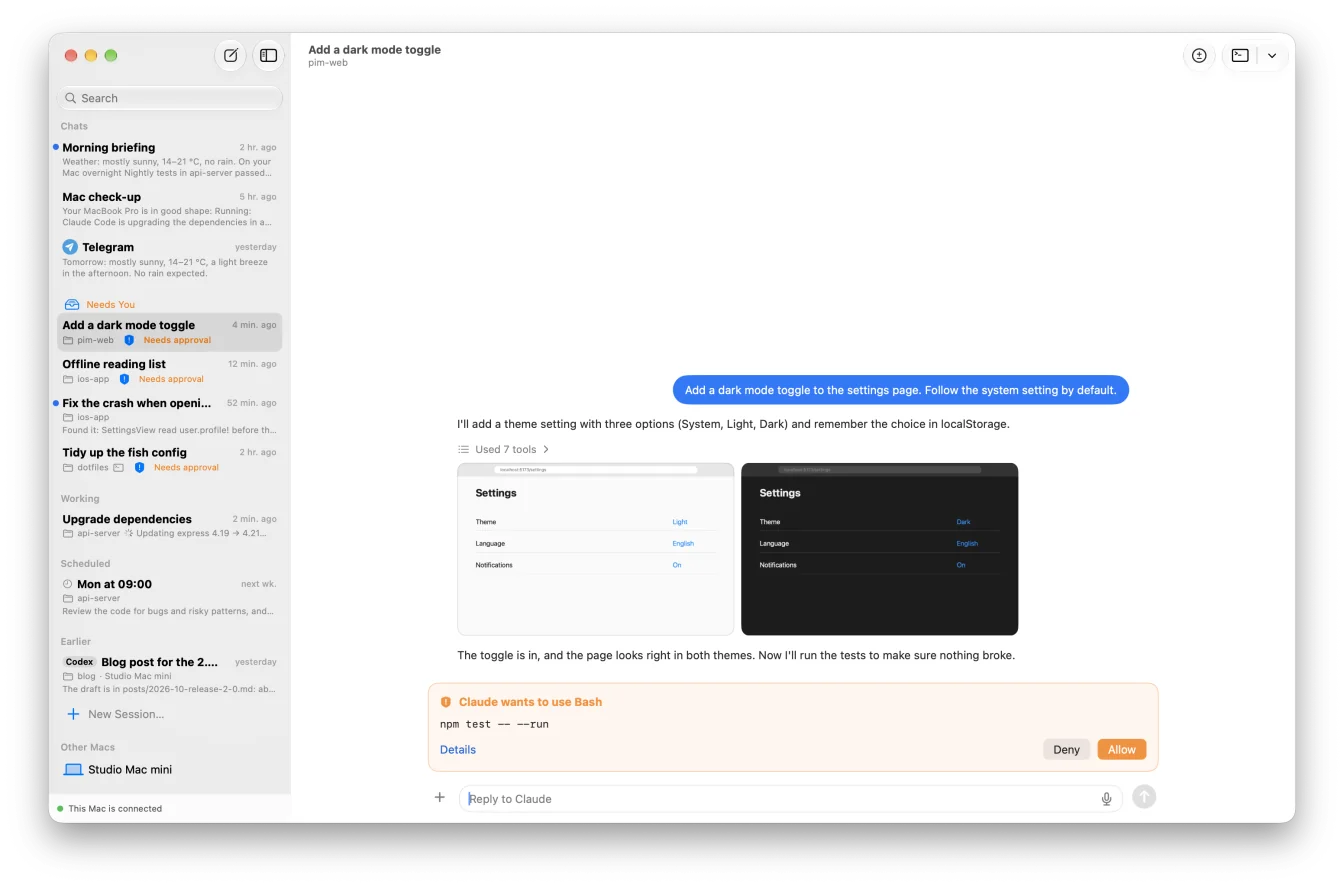
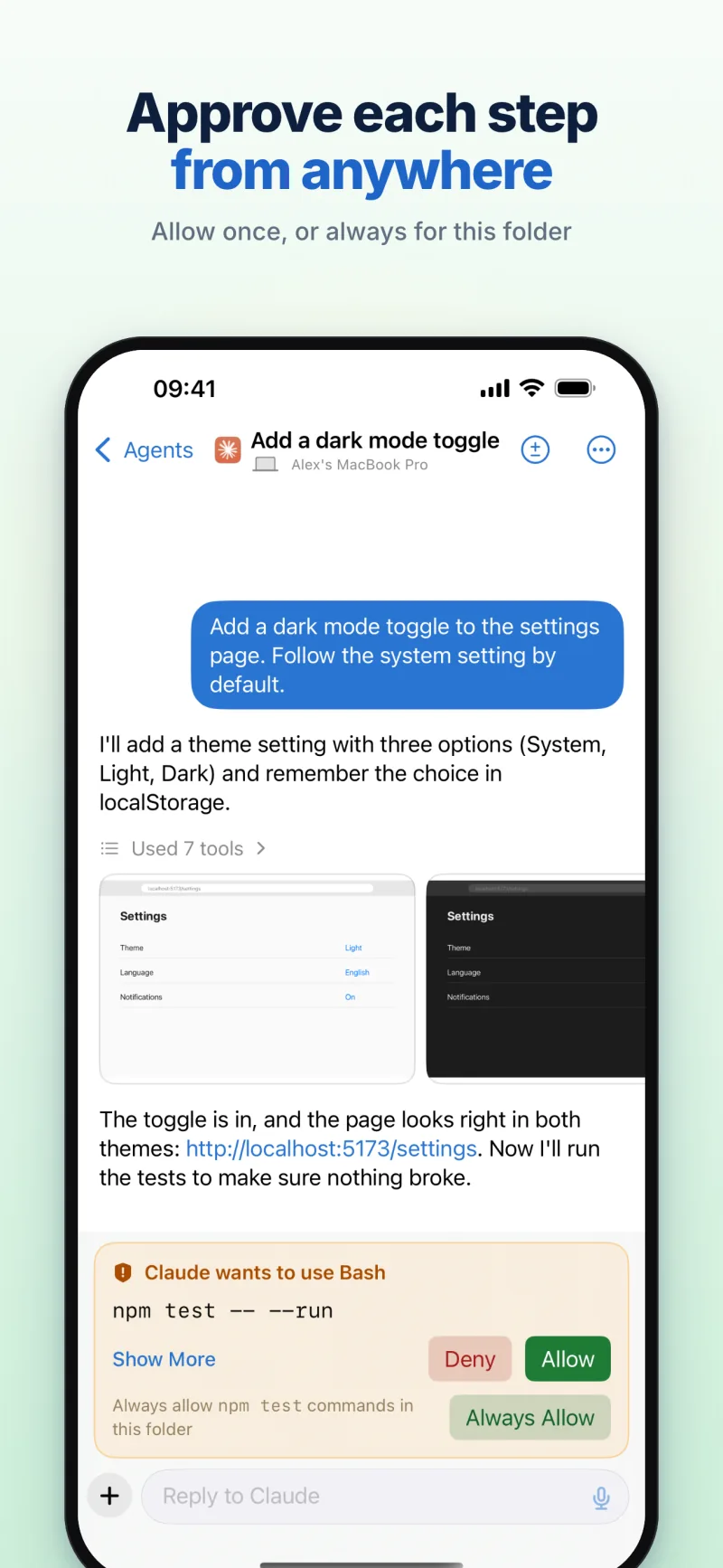
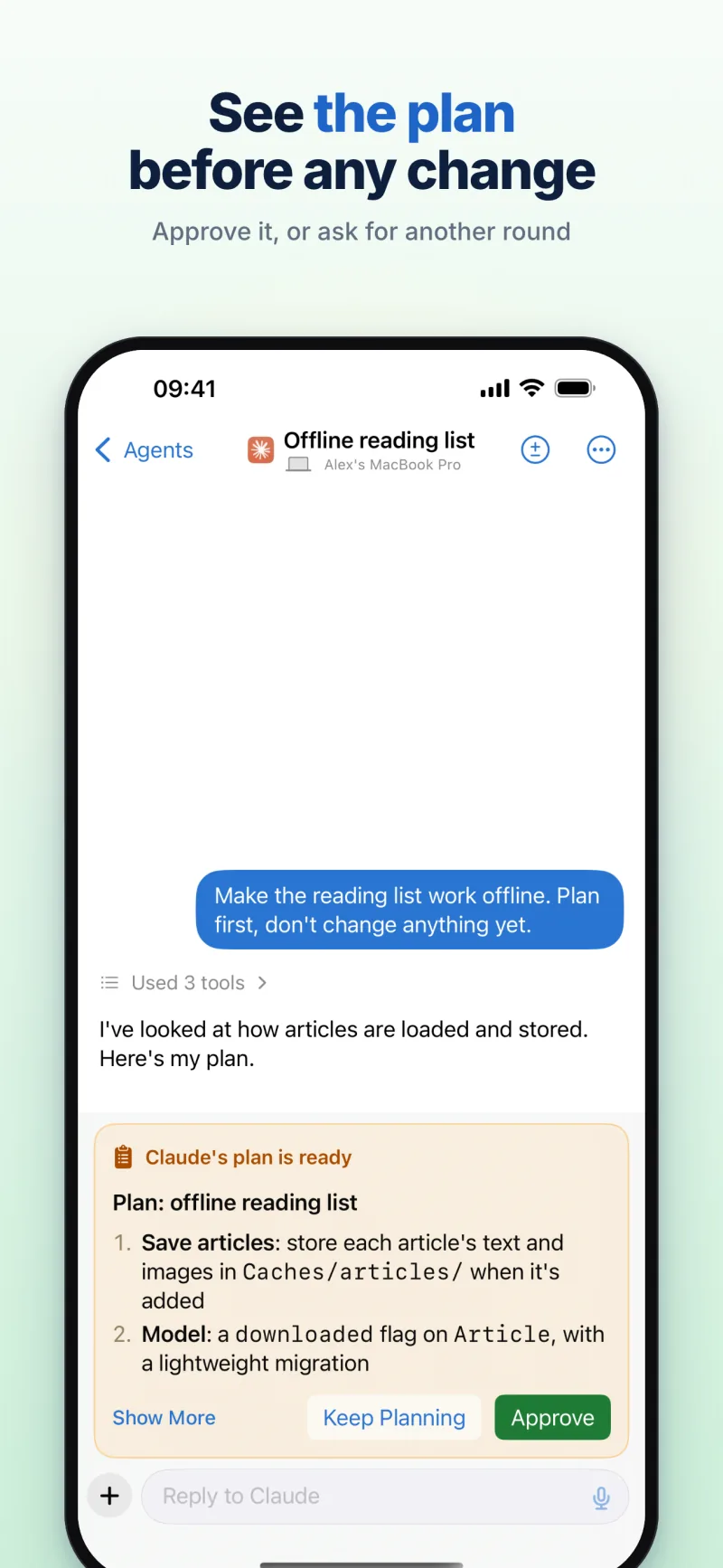
When Claude Code wants your OK — to run a command, say — the question comes to your phone: answer it in the session, right in the list, from the notification or on the iPhone's Live Activity (Android's progress notification has the same buttons). Allow needs the phone unlocked. Where Claude Code offers to remember the answer, Always Allow saves the rule, as it would at your desk. Pick an option when it asks you to choose; read a plan before anything changes.
The terminal, live
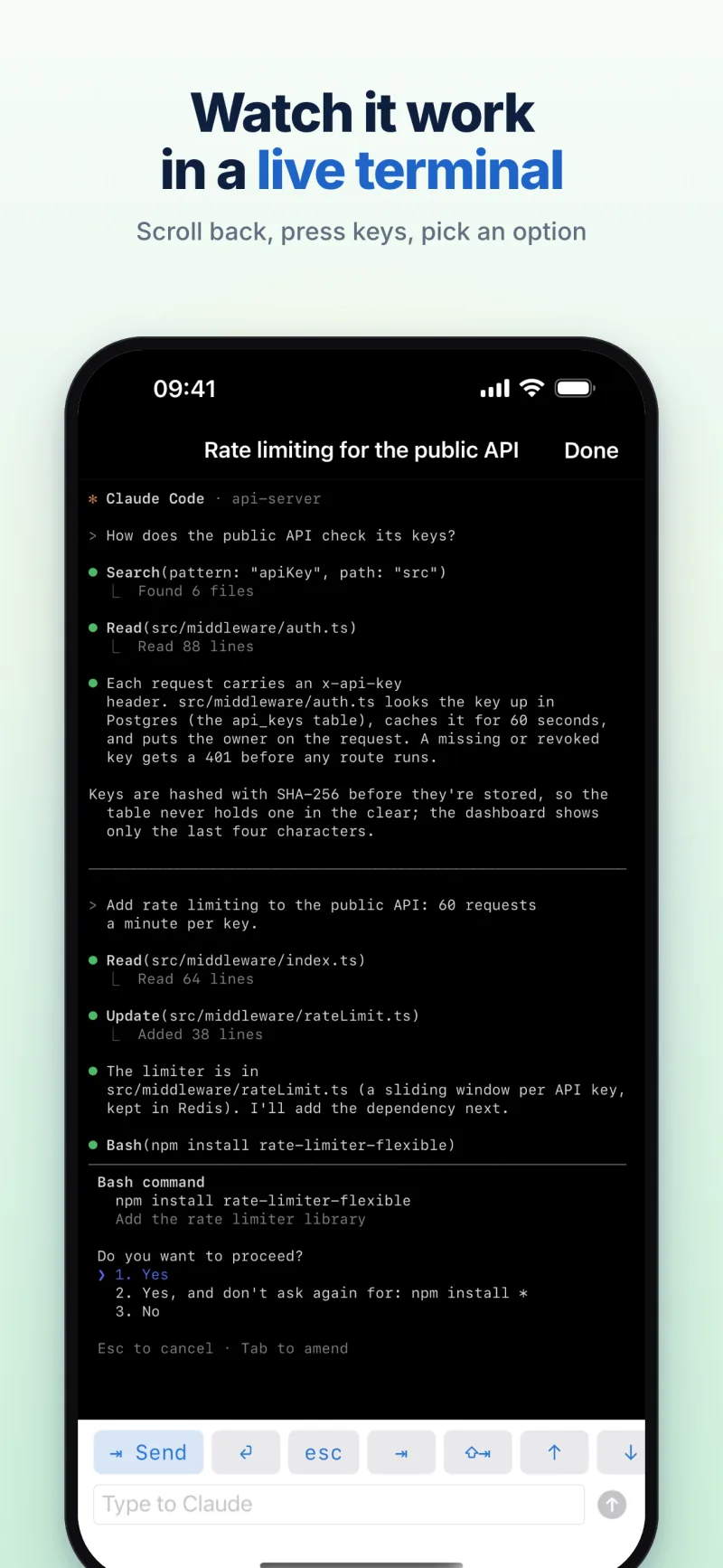
Open Live Terminal on a Claude Code session you started from your phone and watch its terminal on the Mac as it is, in colour. Press the keys Claude Code's prompts take — Esc, Tab, Shift-Tab, the arrows, Return, 1 to 3 — or ⇥ Send to send the message Claude Code suggests, and drag to scroll back. With Pim for Mac 1.10 the terminal comes straight from your Mac, encrypted end to end, and follows your finger as you scroll. Compact the conversation or switch its mode, from Ask First to Auto, from the session's menu.
Review the diff, then ship it
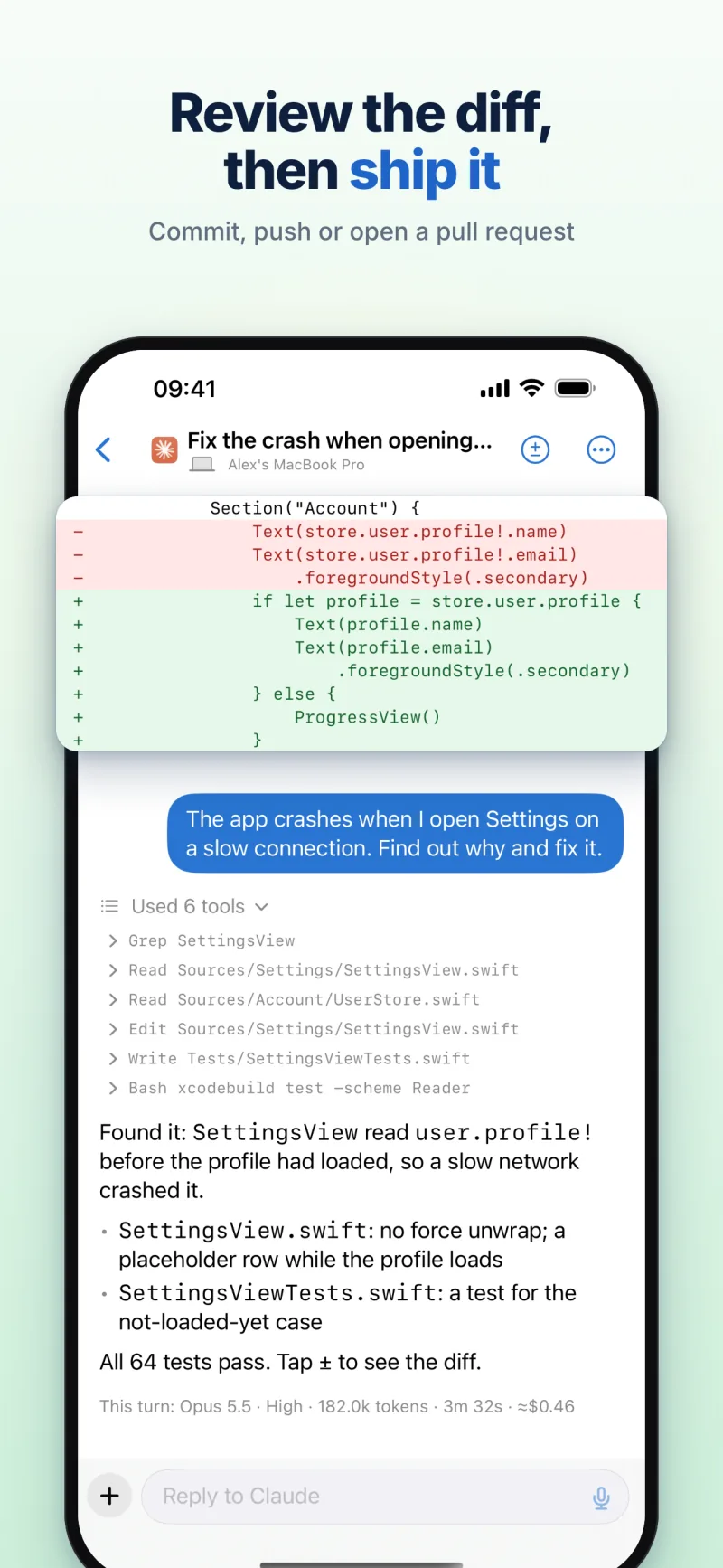
See the uncommitted changes file by file, in colour. Tap a line to comment on it and send all your comments to Claude in one message; then have the agent commit, push or open a pull request. Every turn shows its model, tokens and time. And a Claude Code session you start from your phone is the same Claude Code you'd run at your desk: open it in a terminal on your Mac and carry on from either.
See the app you're building
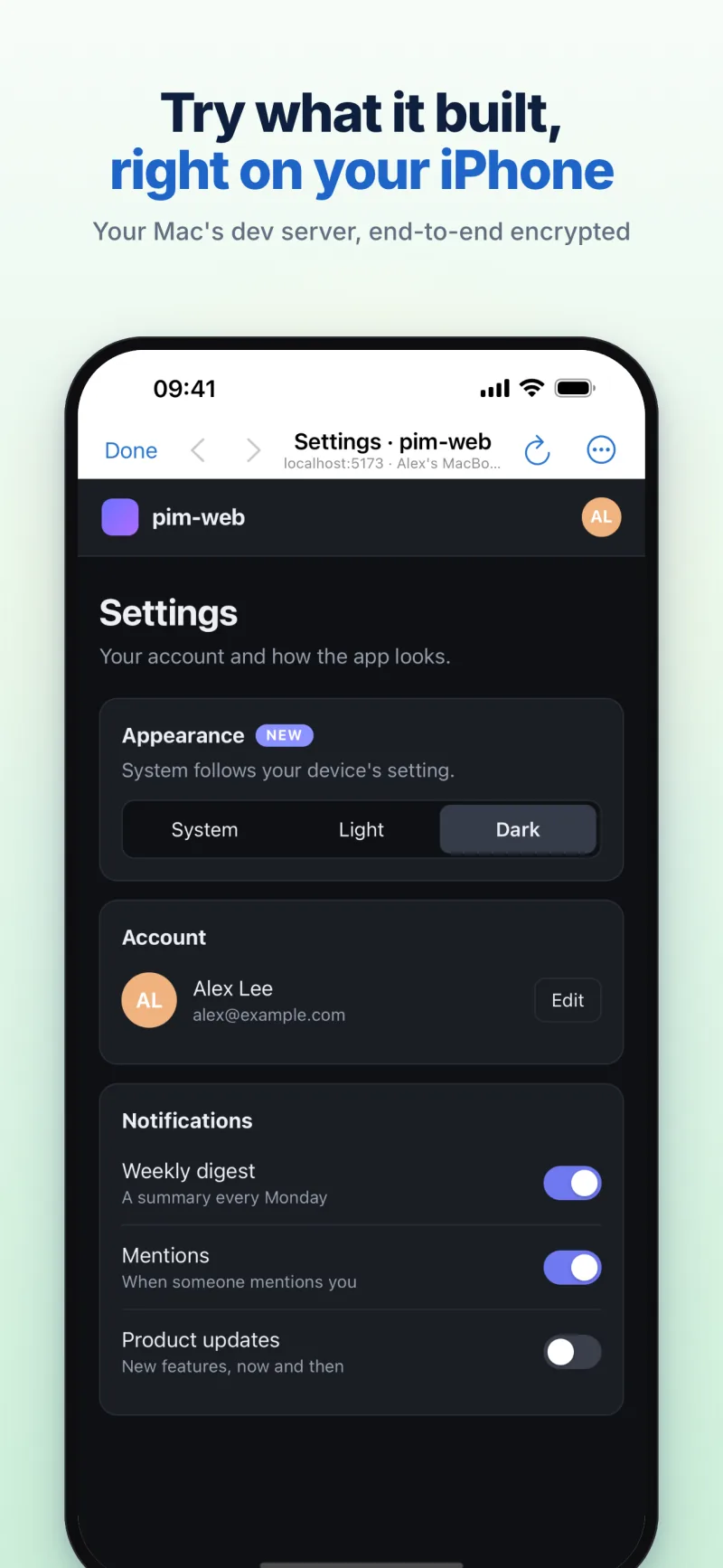
Web Preview opens a dev server running on your Mac — localhost:5173, say — in Pim on your phone, so you can click through what the agent just changed. Start it from the session's menu, a localhost link in the conversation or the Remote tab. The page is encrypted end to end between your phone and your Mac, and none of it is stored.
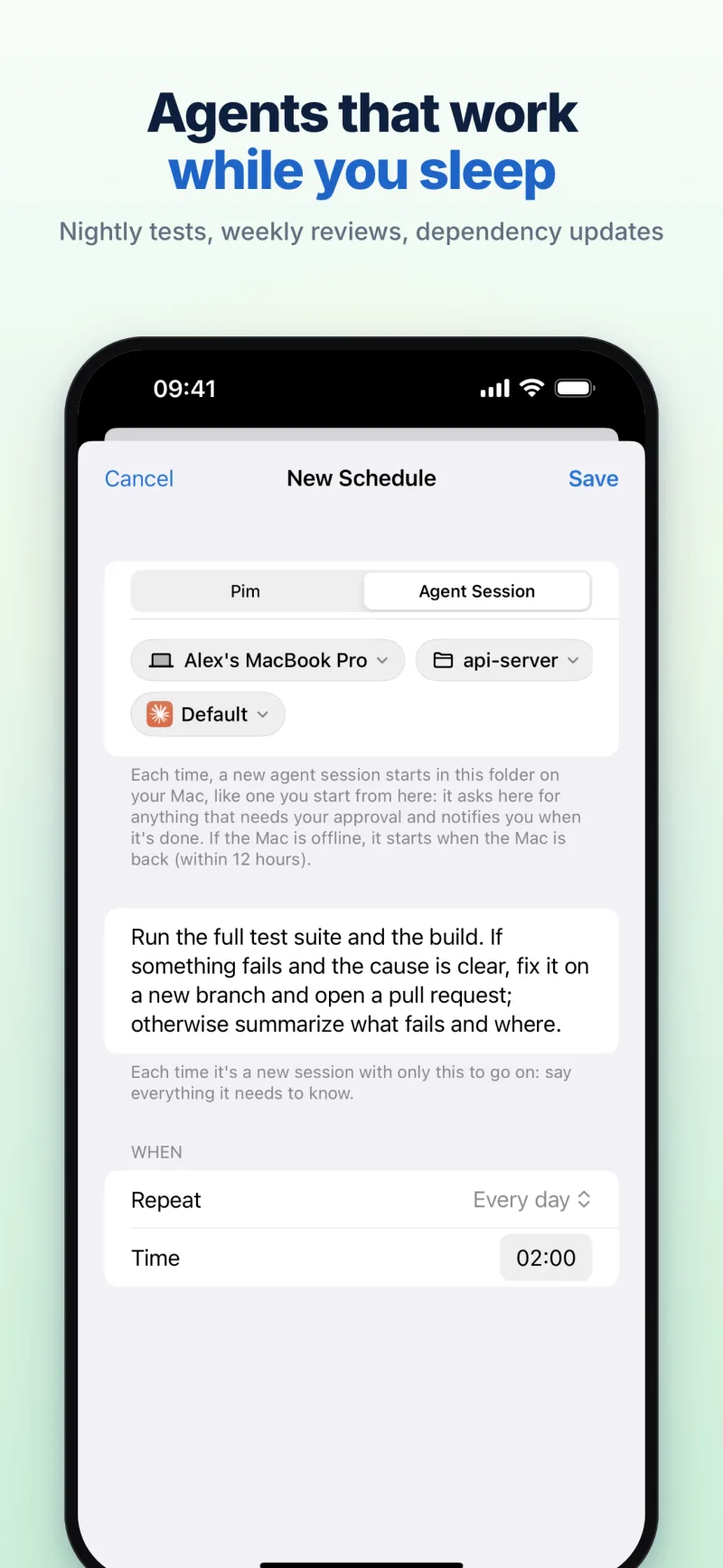
Agents that work while you sleep
Schedule agent sessions: dependency updates every week, the tests every night, a code review on Mondays. Each starts in its folder at the time you set — or, if the Mac is asleep, as soon as it's back.
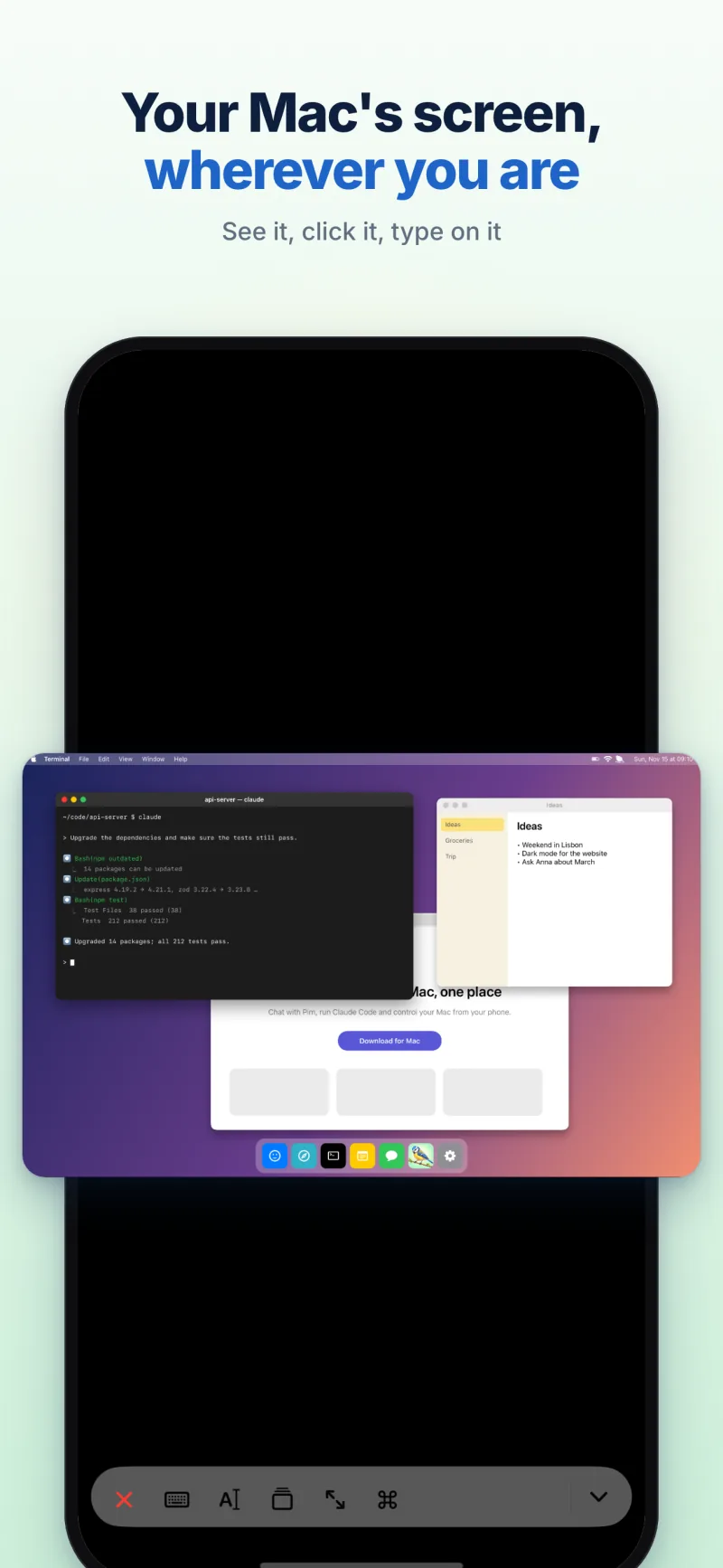
Your Mac's screen, wherever you are
See and control your Mac's desktop as smooth video, without typing your Mac password: tap to click, drag to scroll, pinch to zoom, with a keyboard and a window switcher. Pim unlocks a locked Mac for you, and Curtain mode keeps its own display dark while you work. Switch to another app for half a minute and the picture is still there when you're back.
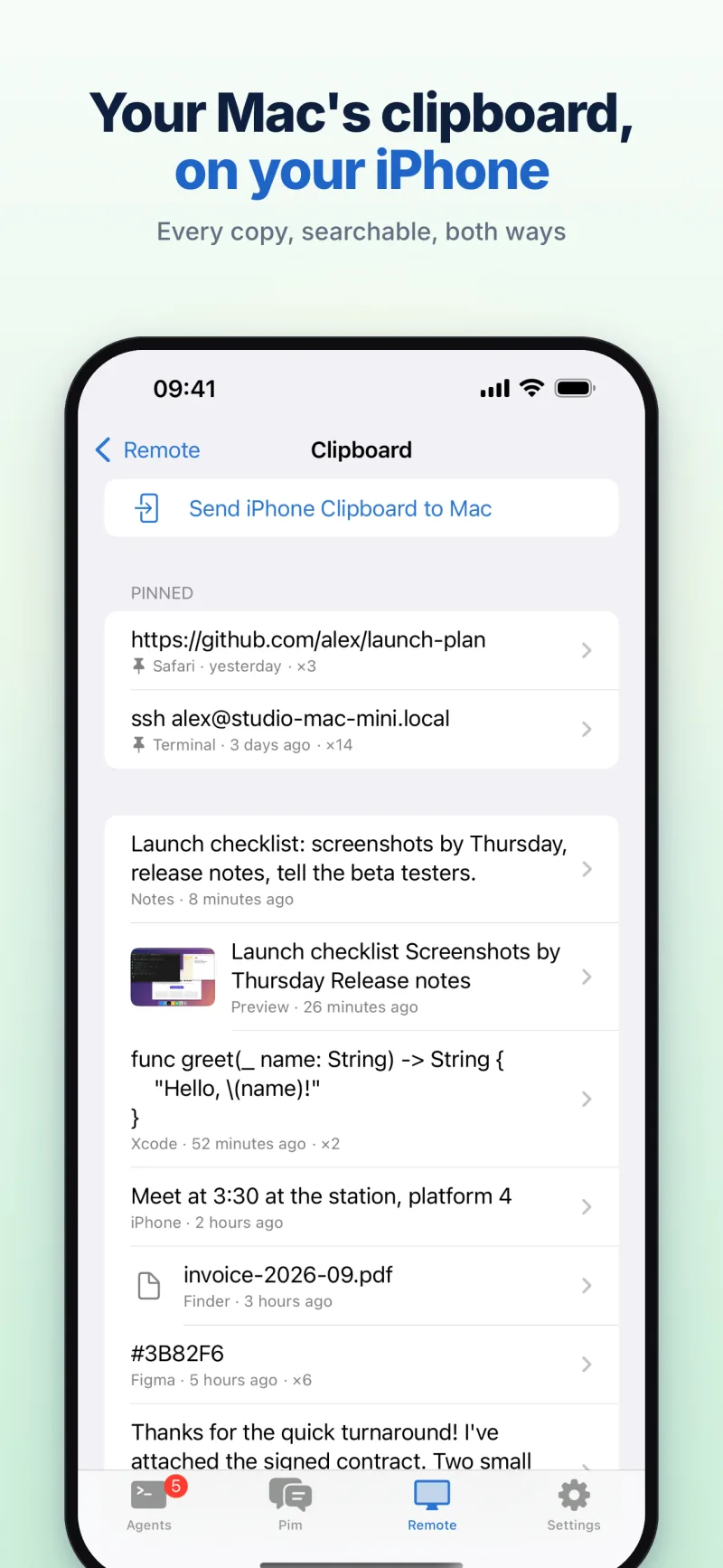
Files and clipboard, both ways
Browse and search your Mac's files, open them on your phone, or send photos and files into any folder. Turn on clipboard history in Pim for Mac and it's on your phone too: copy any item over, or put one back on the Mac.
Private by design
The AI runs on your own Mac, with your own Claude Code or Codex account. The screen is relayed live and never recorded, attachments are deleted after 7 days, and there are no ads and no tracking. Lock Pim with Face ID, or on Android with your fingerprint, face or screen lock; delete your account in the app.
Pim for Mac
The free app that runs your agents for your phone — and just as useful at your desk.
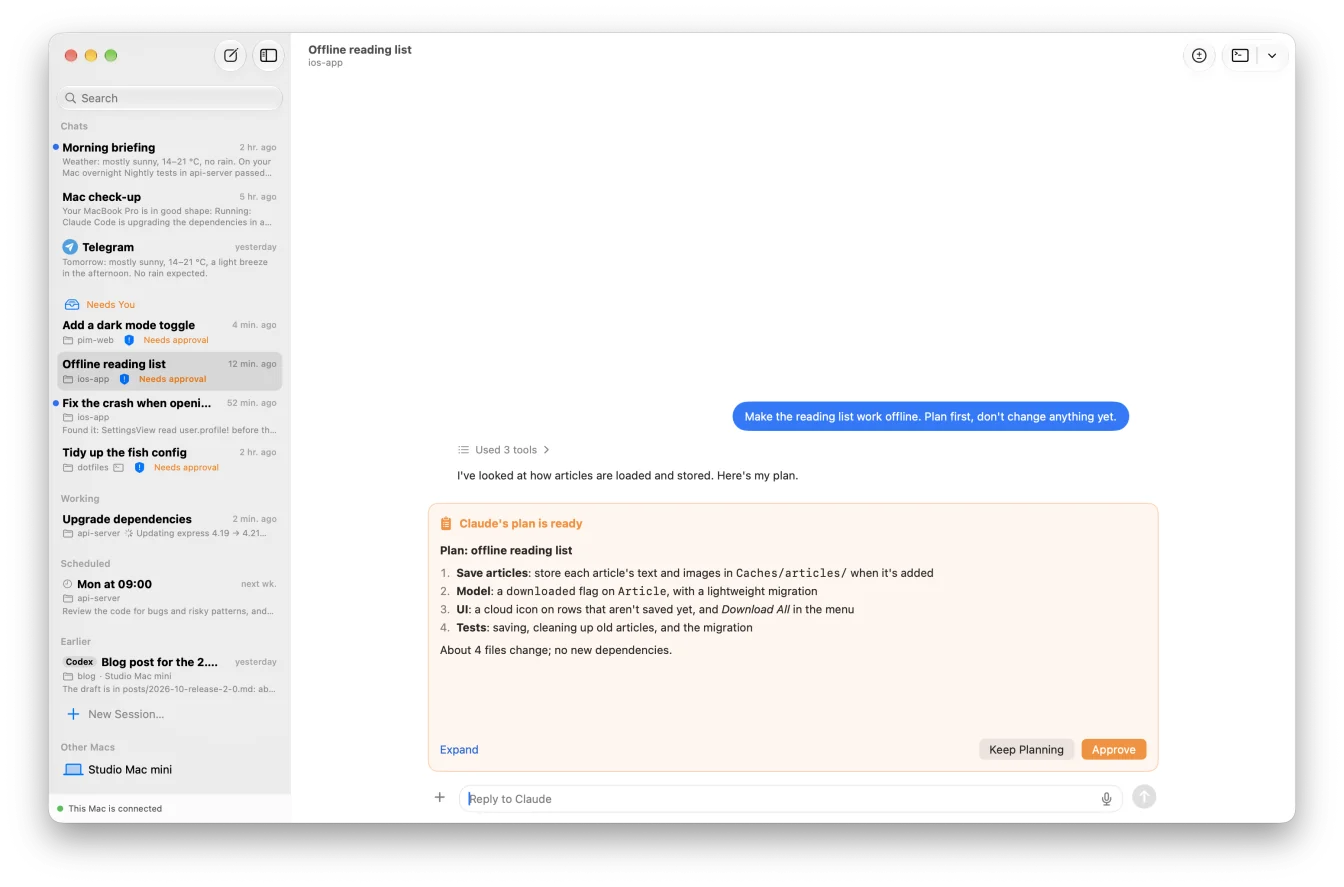
Every session in one window
Your Claude Code and Codex sessions and your conversations with Pim side by side, grouped as on your phone: Needs You, Working, Scheduled, Today, Earlier. Approve a step or a plan right there, start a session in any folder, and write the next message while the agent works. Open in Terminal picks a session up in Ghostty, iTerm or Terminal.
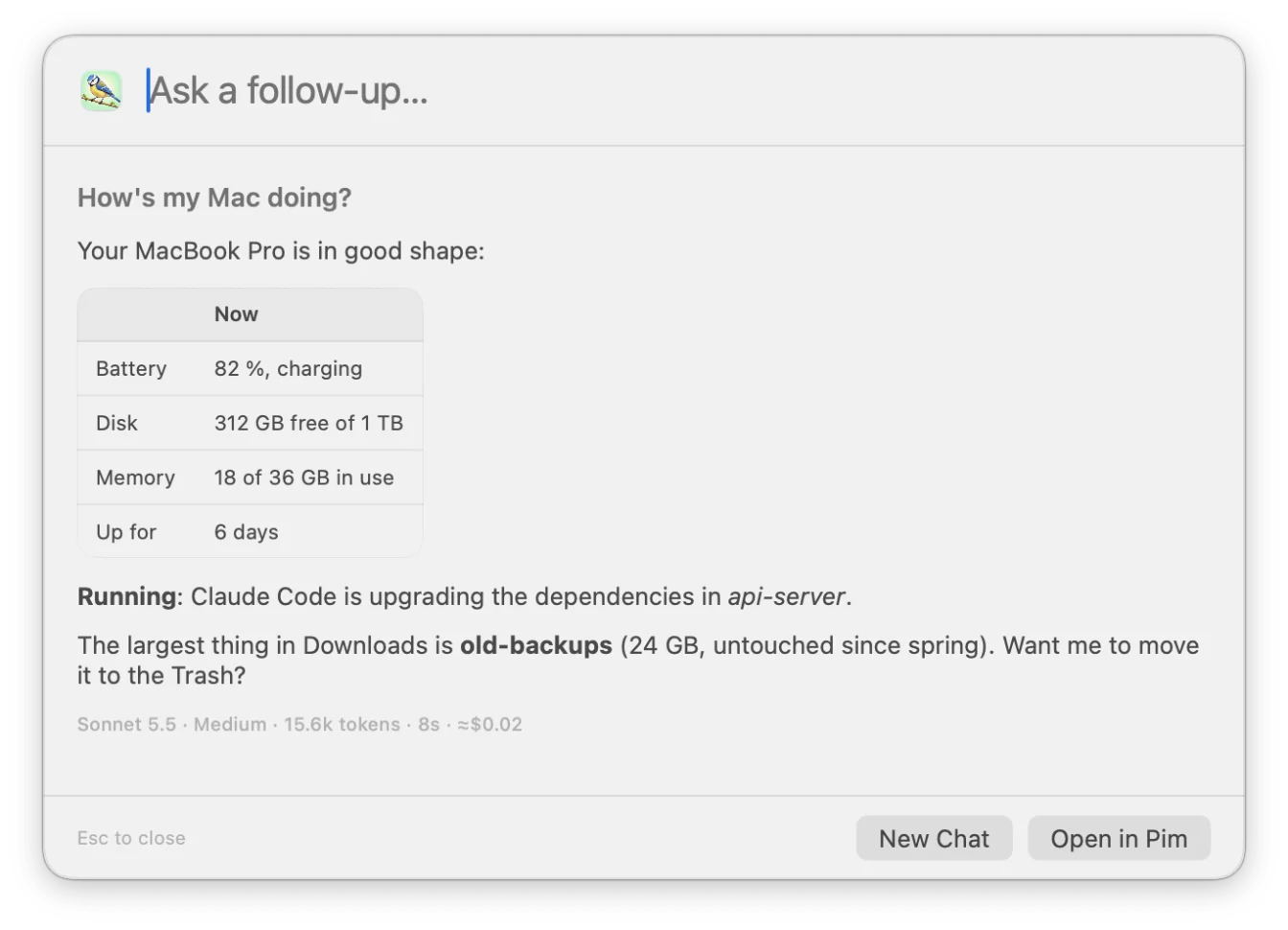
Quick Ask, over any app
Press ⌥Space wherever you are and ask Pim — about the Mac, a file, anything. Follow-up questions stay in the same conversation; ⌘O opens it in the main window.
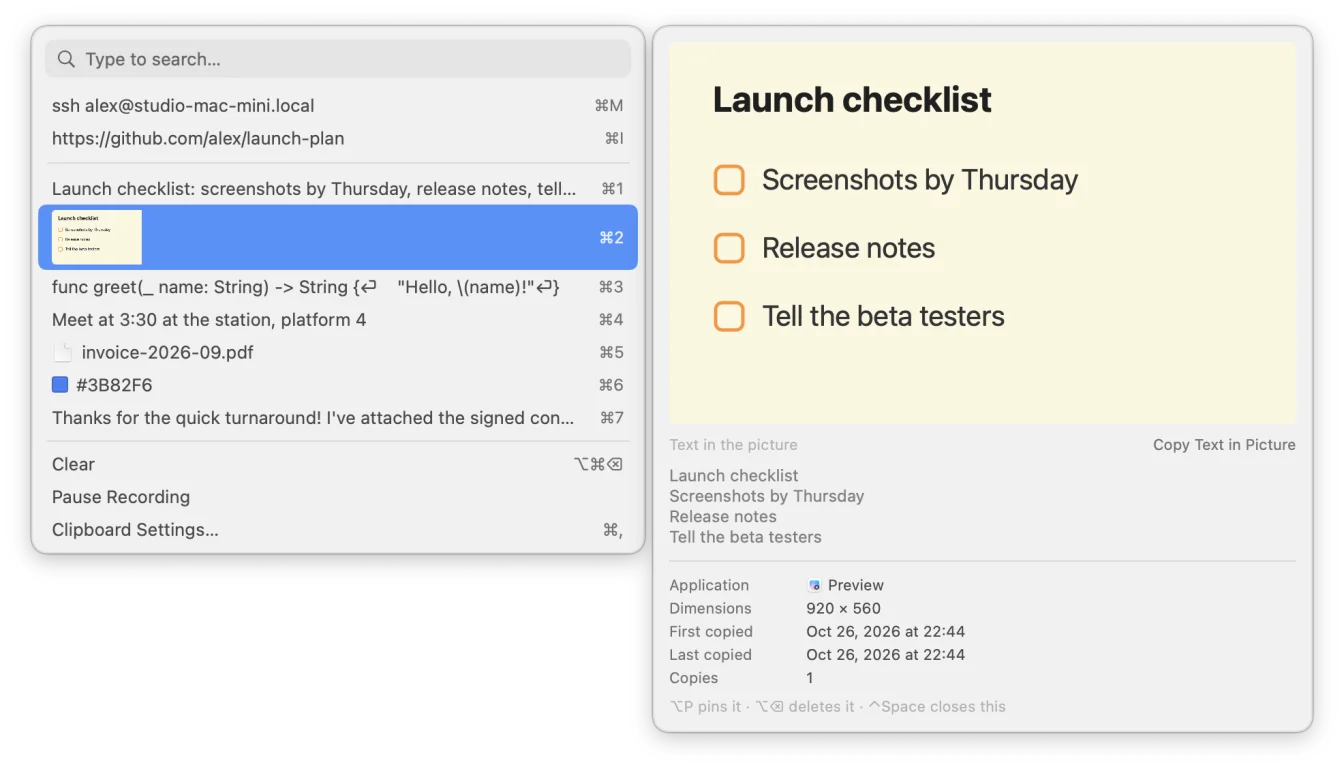
A clipboard history that stays on your Mac
⇧⌘C opens what you copied — text, pictures, files — over any app. Search it, even the text in screenshots; pin what you use often; paste straight into the app you were in. Passwords from password managers are skipped, and the history is kept only on this Mac.
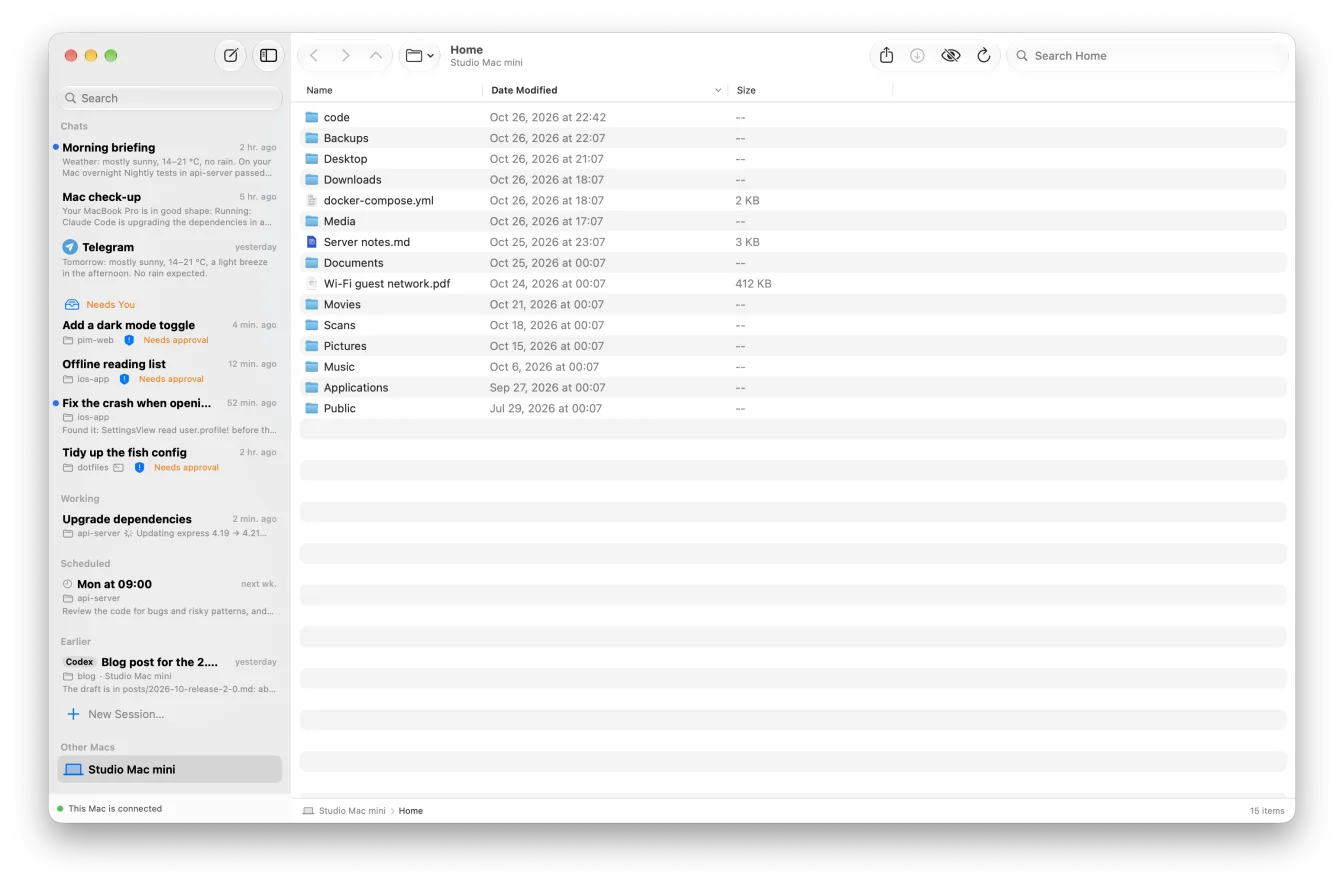
Between your Macs
Pair more than one Mac and they work together: browse and search another Mac's files from the sidebar, copy files over, or send it your clipboard with a shortcut. It goes through Pim's server, so they don't need to share a network or an Apple Account.
Your terminal sessions too
Let your phone see the Claude Code sessions you start in a terminal, with their requests for approval and their questions. Start one with pc instead of claude and you can answer it from anywhere — and have the sessions you start from your phone open a Ghostty window on the Mac too.
Stay Awake
Keep the Mac awake for an hour, three hours or until you stop — with the lid closed too — so it's there when you reach for it from your phone.
App shortcuts
Give any app a keyboard shortcut that opens it or brings it to the front, and hides it if you press it again — Safari on ⌥S, Terminal on ⌥T, whatever you like.
Set up in three steps. Install Pim for Mac and allow Screen Recording and Accessibility, so your phone can see and control the Mac. Sign in on your phone — with Apple, Google or your email on the iPhone, with Google or your email on Android. Then scan the QR code your Mac shows, or type its 8-character code, to pair them.
Look around first. Tap Try the Demo on the sign-in screen: sample agent sessions, an approval, a plan, a diff and a simulated Mac desktop, with no account and no Mac. The demo answers on your phone and sends nothing to our server.
More than one Mac? Pair them all. Choose which one each new session, schedule or screen connection uses; your primary Mac is the one Pim answers from, and the others show up in the app with their files and clipboard.
Independent. Pim is made by TIT and is not affiliated with Anthropic or OpenAI. Claude Code (Anthropic) and Codex (OpenAI) run on your Mac under your own account with them, and their terms apply.
More about Pim
Frequently asked questions
Can I use Claude Code from my iPhone or Android phone?
Yes. Pim for Mac runs Claude Code — or Codex — on your Mac, and Pim on your phone starts sessions in any folder, shows every step as it happens, answers Claude Code's permission requests and shows the changes as a diff. The code and the agent stay on your Mac; the phone is the remote.
What do I need to use Pim?
An iPhone with iOS 18 or later or an Android phone with Android 8.0 or later; a Mac with Apple silicon and macOS 14 or later, running Pim for Mac (a free download from pim.titdev.nl/mac); and Claude Code or Codex set up on that Mac with your own account. The Mac has to be on and online, and Pim can keep it awake while you're away.
Is there an Android version?
Yes, on Google Play, for phones with Android 8.0 or later. It does what the iPhone app does — agent sessions, approvals, plans, the diff, schedules, the Mac's screen, files and clipboard, conversations with Pim — with the same Pim for Mac and the same account. A progress notification takes the place of the Live Activity, you sign in with Google or your email, and you pair a Mac by scanning its QR code with the camera app or typing its code. Voice input, voice mode, widgets and sharing to Pim from other apps are on the iPhone only; Android's keyboard can dictate.
How much does Pim cost?
Pim and Pim for Mac are free, with no ads and no in-app purchases. The agents run under your own Claude Code or Codex account, so what they do counts against your plan with Anthropic or OpenAI, as it would at your desk. Under each turn Pim shows the model, the tokens and the time.
Does my code go through your server?
Your code stays on your Mac, where the agent works on it. When you open a session, the app reads the conversation, the steps, the diff and the live terminal from your Mac through our server, which passes them on without storing them; a Web Preview of your dev server goes through it encrypted end to end. Your conversations with Pim are kept on the server so they sync between your devices, until you delete them. If Pim crashes, it sends us a report with what the app was doing just before — its connections and requests, never your messages, files or code — and you can turn that off in Settings. The privacy policy has the details.
Can I see the Claude Code sessions I started in Terminal?
Yes, if you turn it on in Pim for Mac (Settings → Terminal Sessions; it's off until you do). The Claude Code sessions running in a terminal on your Mac then show up in the app with their conversation, with the screenshots their tools took. Those running in Ghostty you can answer from your phone too: Pim types your reply into that session on the Mac. Start a session with pc instead of claude — or open one from Pim — and you can answer it in any terminal. Turn on Approvals and questions on iPhone (also under Terminal Sessions) and every session brings its requests for approval and its questions to your phone — an Android one too — where you tap Allow or pick an answer.
What does Always Allow do, and how do I take it back?
When Claude Code asks for your OK and offers to remember the answer — what "Yes, and don't ask again" does in a terminal — Pim shows Always Allow with what it will save, such as "Always allow npm test commands in this folder". Tap it and Claude Code saves that rule as it would at your desk: a rule for the folder goes into .claude/settings.local.json in the project folder on your Mac and counts for every Claude Code session there; one for this session lasts as long as the session. To see a folder's rules, open a session in it and choose Allowed in This Folder in its menu; swipe a rule to remove it, or edit that file on the Mac.
Can I open the web app my agent is working on?
Yes, with Web Preview: choose Preview Web App… in a session's menu, tap a localhost link in the conversation, or open Web Preview in the Remote tab, then pick one of the ports your Mac is listening on (those in the session's folder come first). The page opens in Pim as if you were browsing localhost on the Mac. Each connection it makes goes from your phone through our server to Pim for Mac, which connects to that port; it's encrypted end to end between your phone and your Mac, so the server passes on what it can't read, and nothing is stored. Only you can open it, and only on a Mac you paired.
Can Pim approve things for me?
No. Pim can start sessions, follow them and pass them your next instruction, but approving what an agent wants to do — and answering Claude Code's questions — is always yours, on your phone.
Do Codex sessions ask for approval too?
No. Claude Code asks when it needs your OK, and Pim brings the question to your phone. Codex runs in its own sandbox: it can change files in the session's folder and use the network — to push, for example — and doesn't stop to ask. You still see every step and the diff.
Can I control my Mac's screen when I'm away from home?
Yes, over any connection — not only on your home network. Pim for Mac streams the screen as video through our server, which relays it live and never records it, and you don't type your Mac password for it. When the Mac is locked, Pim unlocks it with its user name and password, which are kept on your phone — in the iPhone's keychain, or on Android encrypted with a key in the Android Keystore — and go only to your Mac, encrypted end to end.
Can I try Pim without a Mac?
Yes. Tap Try the Demo on the sign-in screen. The demo answers everything on your phone with sample data — agent sessions waiting for approval, a plan, a diff, two Macs, a simulated desktop — and sends nothing to our server.
Is Pim made by Anthropic or OpenAI?
No. Pim is an independent app by TIT, not affiliated with Anthropic or OpenAI. It works with the Claude Code and Codex you already use on your Mac.
Leave your desk. Not your agents.
Pim for iPhone and Android, and Pim for Mac. All free.